What we are going to build
The Customer Management app end to end — the final result, the pieces it is made of and the map of the guide's stages.
This guide builds, from scratch and without skipping steps, the Customer Management app — a CRM with accounts, contacts and business opportunities. It is the same app that illustrates this whole documentation: every figure you see in the other chapters comes from it.
At the end of the guide you have an application running at an address of its own, with its own login screen, its own users and its own data — ready to be used by people who have never heard of Keplin.
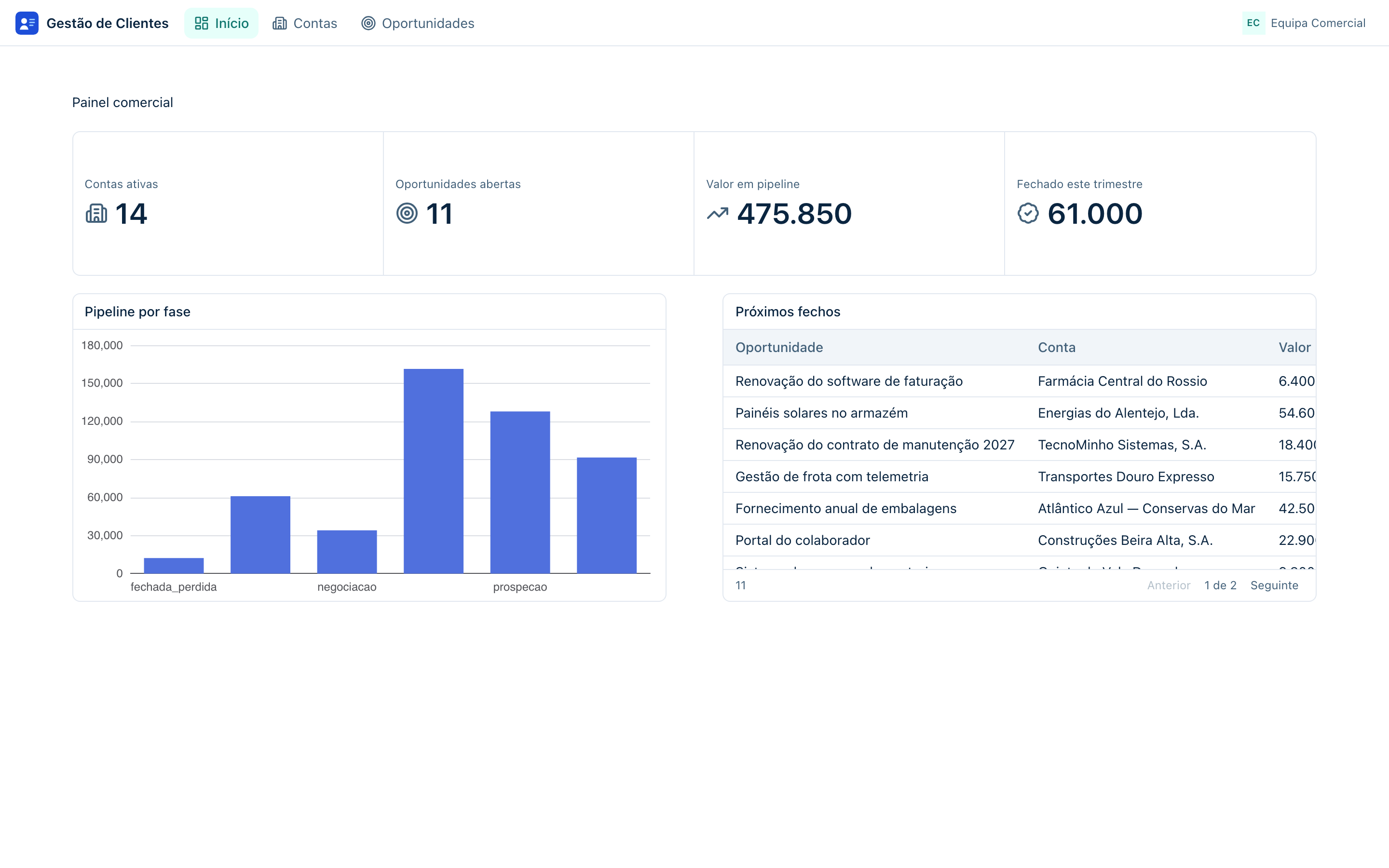
The app in two sentences
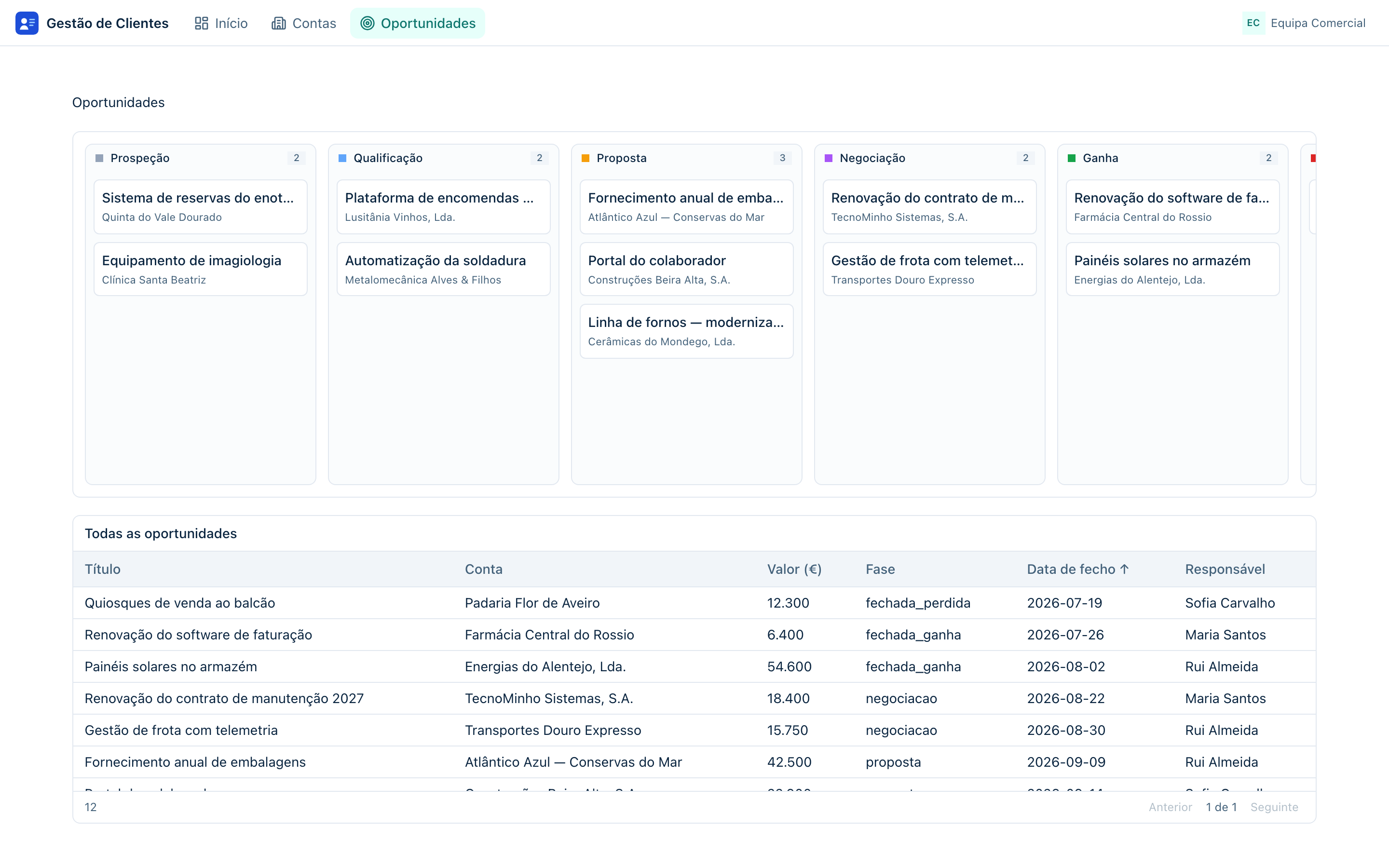
Customer Management manages companies (accounts), the people in those companies (contacts) and the deals in progress with them (opportunities). The sales team consults and edits everything on four screens — a dashboard, a list of accounts, an account record page and a kanban board of opportunities — and gets an automatic summary of what is waiting to be qualified every morning.
What gets done, stage by stage
The guide is broken into six stages. Each one is a page of this chapter, and each one ends with something working — you can stop between stages and pick it up later.
| Stage | What you build | What you learn along the way |
|---|---|---|
| Creating the app | The empty app, with a name, an icon and a description. | The workspace: the side tree, the tabs and the Overview. |
| The data model | A database for the app with 3 tables and 2 relations. | Creating tables and columns, importing tables into the model, linking entities. |
| The screens | The table APIs and the 4 screens: dashboard with KPIs, table of accounts, account record page and kanban. | Datastores, widgets, data bindings, table actions, route parameters. |
| Navigation and theme | The app's menu, the logo and the brand colors. | The navigation editor per device and the theme editor. |
| Logic and automation | A Python script that counts the opportunities waiting to be qualified and warns the team, scheduled for weekday mornings. | The script editor, runs, and schedules with catch-up. |
| Publishing and using | The published app, with the first user and the first login. | Versions, publishing to hosts, app users and roles. |
The data model in short
Three tables are enough for a working CRM — and enough to touch almost everything Keplin's data model knows how to do:
| Table | What it stores | Links to |
|---|---|---|
contas |
The companies: name, tax number, sector, city, general contacts. | — |
contactos |
The people of each company: name, job title, email, phone. | Each contact belongs to one account. |
oportunidades |
The deals: title, value, stage (kanban) and expected closing date. | Each opportunity belongs to one account. |
The fase field of the opportunities is what brings the kanban board to life:
each value is a column of the board, and dragging a card from column to column
saves the new stage in the record. The six stages of our CRM are prospecao,
qualificacao, proposta, negociacao, fechada_ganha and
fechada_perdida.
What you need before you start
- An account on the platform with an administrator or developer profile — if you have not signed in yet, the First steps chapter shows how.
- Nothing else. The app's database is created inside the app itself, in the course of the guide — you need no database server, no files, no external credentials.
Note
The names used in the guide — tables, fields, screens, routes — are the same as in the figures. If you change them, adapt the following steps accordingly: the guide always refers to the original names.
Tip
Follow the stages in order. Each one assumes what the previous one left done — the screens need the APIs, the APIs need the model, the model needs the app.
Ready? Move on to the next page — Creating the app.