Events and the SDK
The widgets' and the screen's events, the code editor, the pre-defined actions and the keplin SDK in TypeScript — data, widgets, navigation, session, modals and workflows.
Plenty of screen gets built without writing a line: binding a datastore, dragging widgets, pointing a button at another screen. But sooner or later the "when this happens, do that" shows up — save and go back, reload a table after a filter, confirm before deleting, open a modal and use what it returned.
That is what events are for: points of the screen where code of yours
runs, written in TypeScript, with an SDK — the keplin object — that
gives access to everything the screen has.
Where the events are
In the inspector, the last category of a widget (and of the screen itself) is called Events. It has one row per available event, and on each row:
- a dot on the left: filled when that event already has code, empty when it does not;
- a … button on the right, which opens the editor.
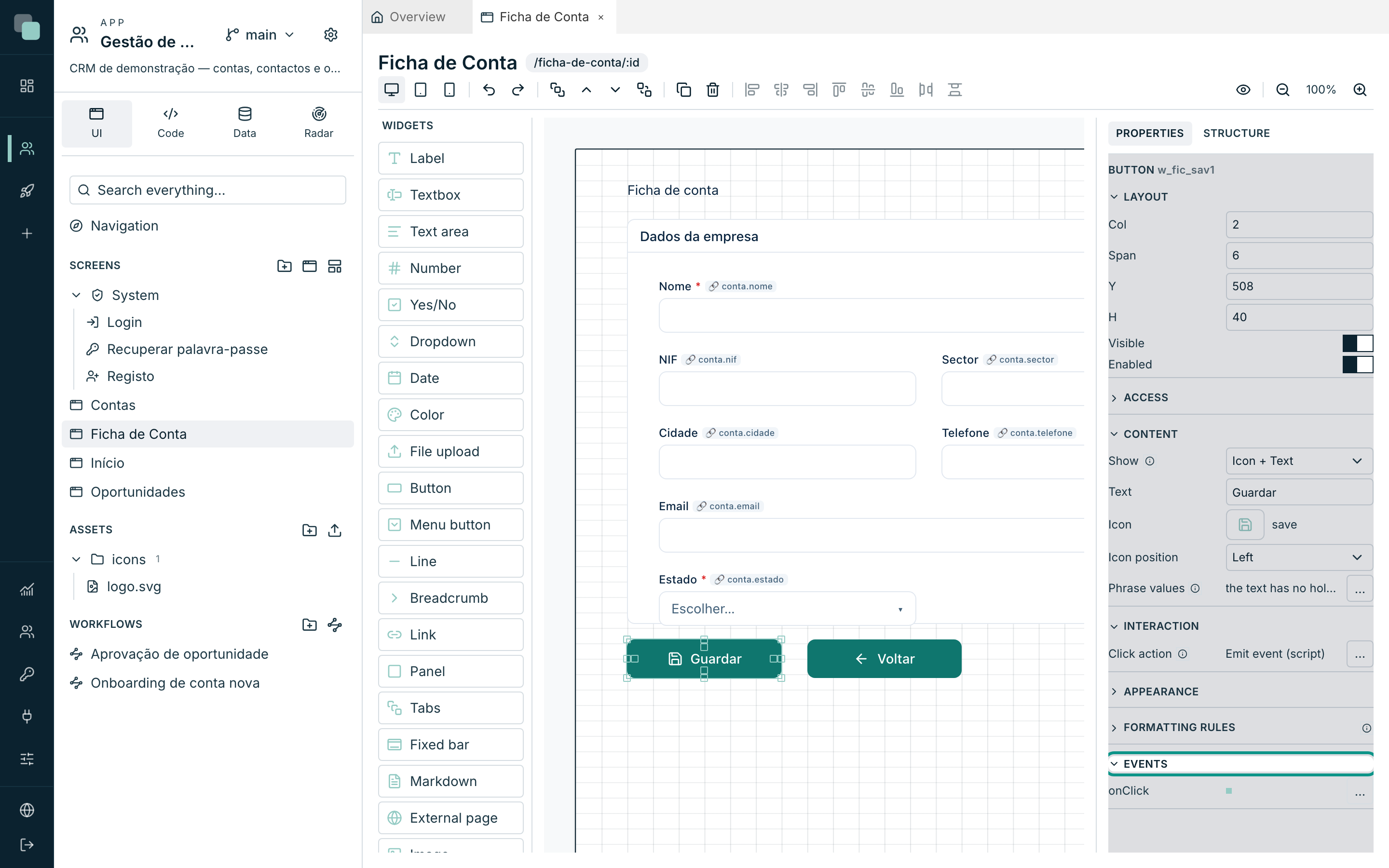
The events' names are not translated — they are the same in any language
(onClick, onRowClick, onLoad), because they are also the names that
appear in the code and in the Radar's records.
The screen's events
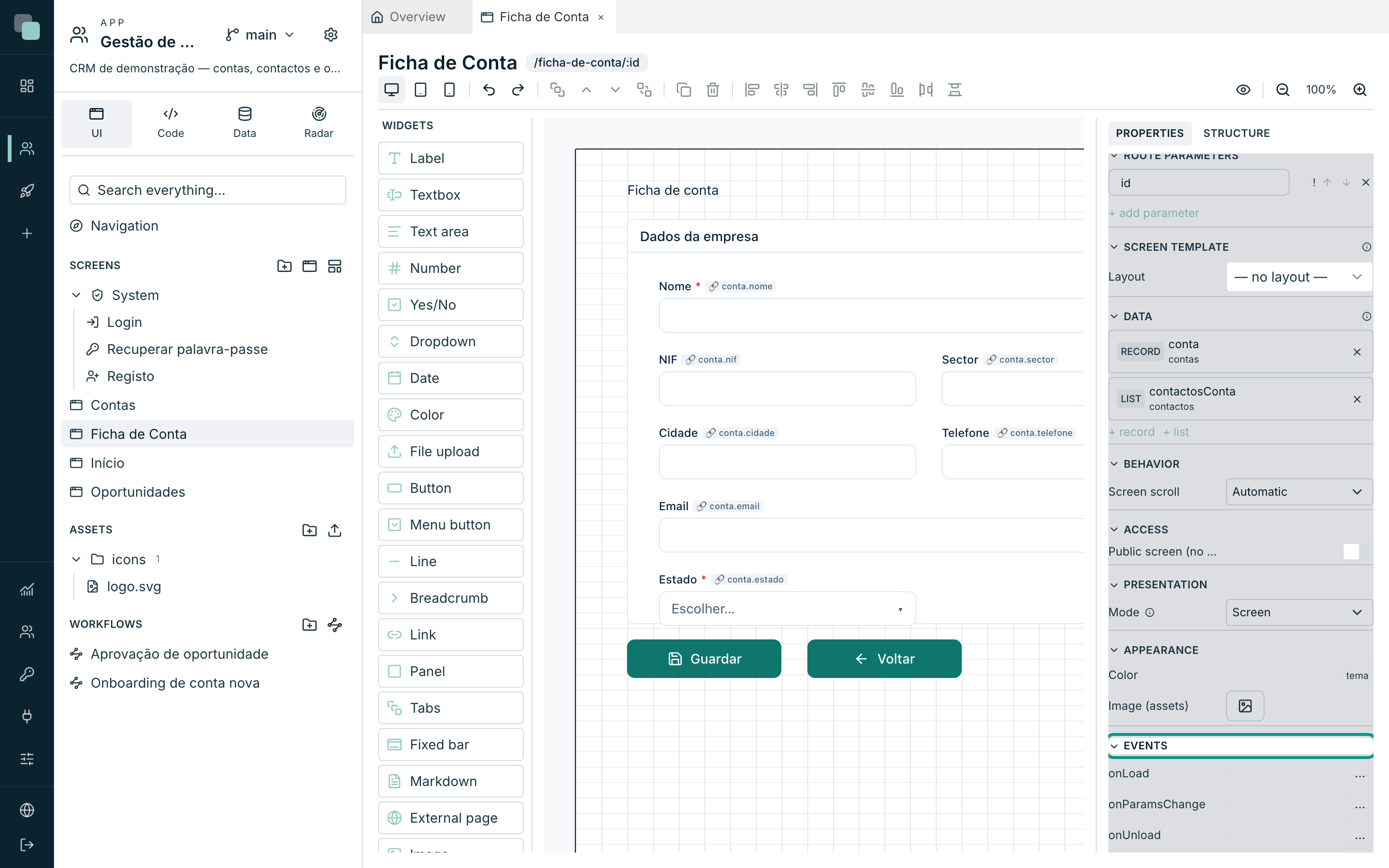
Click an empty area of the canvas so the inspector shows the screen. The Events category has three:
| Event | When it fires | What for |
|---|---|---|
onLoad |
Once, when the screen opens. | Preparing state, loading things the datastores do not load, saying welcome. |
onParamsChange |
Whenever the route's parameters change — and not on the first opening. | Reacting to a record change without reopening the screen. |
onUnload |
When the screen leaves. | Cleaning up state, saving drafts. |
Each widget's events
Each widget type declares its own. Besides the name, what matters is the
payload — the data the event carries with it, which the code reads in
keplin.event.
Form fields
| Widget | Events | keplin.event |
|---|---|---|
| Textbox, Text area, Number, Yes/No, Dropdown, Date, Color | onChange |
{ value } |
| File upload | onChange, onUpload |
onUpload: { file, name } |
Actions and navigation
| Widget | Events | keplin.event |
|---|---|---|
| Button | onClick |
{} |
| Menu button | onClick, onMenuItem |
onMenuItem: { id, label } |
| Link | onClick |
{} |
| Export | onExport, onDataLoaded |
onExport: { rows, filename, truncated } |
Structure and content
| Widget | Events | keplin.event |
|---|---|---|
| Tabs | onTabChange |
{ tab } |
| Report | onLoad |
{ report } |
Data widgets
| Widget | Events | keplin.event |
|---|---|---|
| Table | onRowClick, onRowDoubleClick, onSelectionChange, onDataLoaded |
{ row, index } · onSelectionChange: { row, rows } |
| List, Cards | onRowClick, onDataLoaded |
{ row, index } |
| Chart | onClick |
{ name, seriesName, value, dataIndex } |
| KPI | onClick, onDataLoaded |
{ value, indicatorId } |
Boards and planning
| Widget | Events | keplin.event |
|---|---|---|
| Kanban | onCardClick, onCardCreate, onCardMoved, onDataLoaded |
{ row } · { column } · { row, from, to, index } |
| Calendar | onEventClick, onDayClick, onRangeSelect, onRangeChange, onDataLoaded |
{ row } · { date } · { start, end } · { start, end, view } |
| Gantt | onBarClick, onEmptyClick, onDataLoaded |
{ row } · { date } |
Processes
| Widget | Events | keplin.event |
|---|---|---|
| Process status | onDecide |
{ task, outcome } |
| My tasks | onOpen, onDecide |
{ task, screenId } |
Note
Widgets programmed by you (the ones that appear on the palette under Custom) declare their own events, and they appear here like any others.
The code editor
An event's … button opens the editor in a modal. The title says where
you are: the widget's id (or the screen's name) and the event's name —
w_fic_sav1 · onClick.
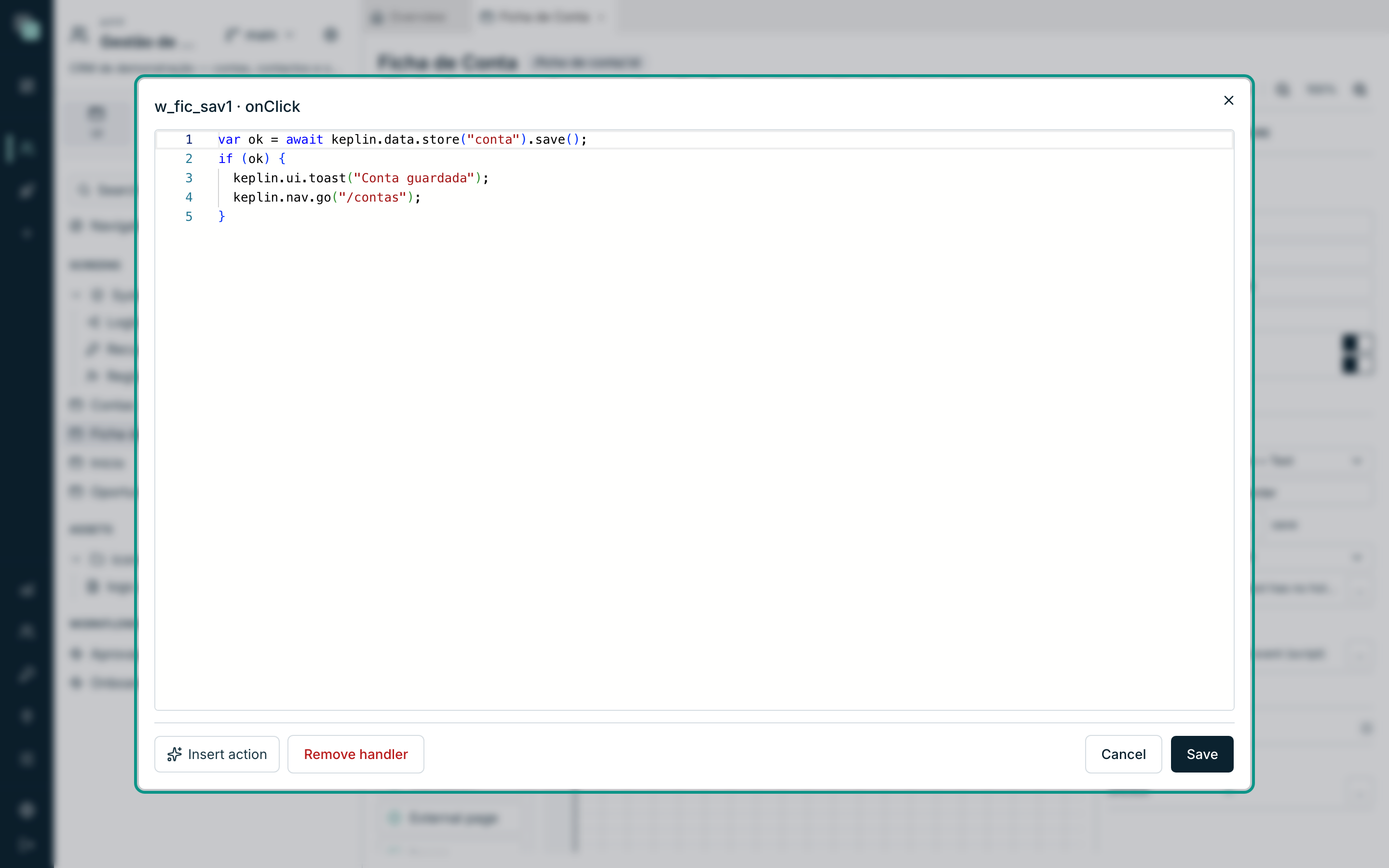
| Button | What it does |
|---|---|
| Insert action | Writes the code of a common task for you (below). |
| Remove handler | Deletes this event's code. The dot goes back to empty. |
| Cancel | Closes without saving. |
| Save | Checks and saves. |
The editor has suggestions as you type (Ctrl+Space): the whole
keplin is declared, with the right types — and, better still, the ids
of this screen's widgets are in there. Typing keplin.widgets.get("
shows the list of the screen's widgets, and an id that does not exist is
flagged as an error before you save.
Warning
On save, the code is compiled. If it is not runnable, the platform refuses it — Event not saved: the code is not runnable — and the modal stays open for you to fix it. A screen is never left with broken code inside.
The pre-defined actions
Insert action opens a list of the most common tasks. You choose one and the code is written at the end of what is already there, already with your screen's real names — the first record datastore, the first table, the first textbox.
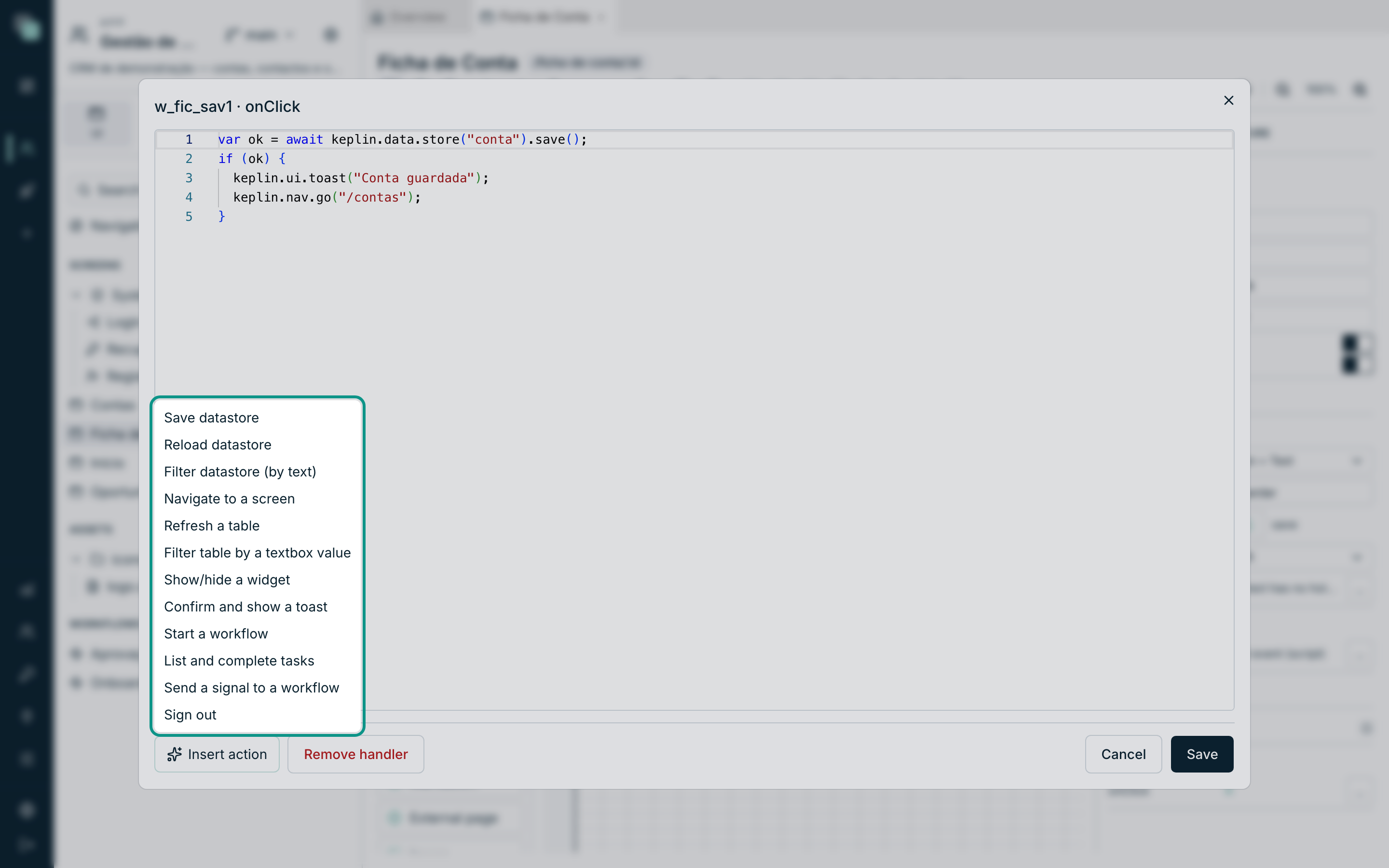
| Action | What it writes |
|---|---|
| Save datastore | Validates and saves the record, with a success notice. |
| Reload datastore | Reads a datastore's data again. |
| Filter datastore (by text) | Reads a textbox's text and applies it as a filter. |
| Navigate to a screen | Jumps to another route of the app. |
| Refresh a table | Refreshes a table widget's data. |
| Filter table by a textbox value | The classic interactive filter. |
| Show/hide a widget | Toggles a widget's visibility. |
| Confirm and show a toast | Asks before acting and notifies at the end. |
| Start a workflow | Sets a process going over the current record. |
| List and complete tasks | Lists the current user's tasks and decides one. |
| Send a signal to a workflow | Wakes up processes that were waiting. |
| Sign out | Leaves the app. |
The inserted code is a starting point: it becomes yours, and it is there to be edited. It is never generated again.
Code is saved formatted: split into lines, indented and with the right spacing, without changing what it does. This applies to every code editor in the platform, and to code that agents save through MCP. Format code, in the editor menu (right-click) or with Shift+Alt+F, formats right away, and Ctrl+Z undoes it. Code with syntax errors is not formatted: it stays as it is until you fix it.
How the code runs
Each event is an asynchronous function that receives one thing only:
the keplin. Three practical consequences follow:
awaitworks at the top of the code. No need to wrap anything.returnexits the event. It is the normal way of giving up halfway (for example, when a confirmation was refused).- There are no parameters. The context comes inside
keplinitself:keplin.eventcarries the payload andkeplin.ctxsays where you are (ctx.widgetis the widget that fired —nullon screen events —,ctx.eventis the event's name andctx.screenthe screen).
While a button's code has not finished, the button shows three animated dots: whoever is using it understands the app is working. If the code blows up, the screen does not break: a notice appears and the error is recorded in the Radar, with the screen, the widget and the event where it happened.
The keplin SDK
Everything the code can do sits under keplin. These are the areas:
| Area | What for |
|---|---|
keplin.event / keplin.ctx |
The event's payload and the context it is running in. |
keplin.widgets |
Talking to the screen's widgets. |
keplin.data |
The datastores: reading, writing, filtering, saving. |
keplin.nav |
Navigating and reading the route's parameters. |
keplin.ui |
Notices, confirmations and modals. |
keplin.state |
State shared between screens. |
keplin.session |
Who is using the app, and what they can do. |
keplin.auth |
Login, sign-up and password recovery (system screens). |
keplin.i18n |
Translated phrases, the current language and switching language. |
keplin.storage |
Preferences kept on the device. |
keplin.api |
Calling the app's APIs directly. |
keplin.reports |
Opening and downloading reports. |
keplin.workflow |
Starting processes, listing and completing tasks. |
The widgets
keplin.widgets.get("id") returns a widget's handle. All handles have
the same basics:
const w = keplin.widgets.get("w_fic_tel1");
w.show();               // show
w.hide();               // hide
w.setEnabled(false);    // disable
w.set("label", "Telemóvel");   // change any inspector property
w.get("label");         // read the effective value
w.reset();              // forget the changes made at runtime
And then each family adds what is its own:
| Family | What it adds |
|---|---|
| Form fields | getValue(), setValue(v), validate(), error |
| Data widgets (Table, List, Cards, Chart, KPI, Kanban, Calendar, Gantt) | rows, total, refresh(), setFilter(where), setSort(sort) |
| Table | selectedRow, selectedRows, clearSelection() |
| KPI | value, values, valueOf(indicadorId) |
| Kanban | columns, moveCard(id, coluna, índice?) |
| Calendar | view, start, end, goTo(data), setView(vista) |
| Gantt | zoom, setZoom(z) |
| Tabs | activeTab, tab("id") — and, on the tab, activate(), show(), hide(), setEnabled() |
| Label / Button / Link / Breadcrumb | setText(t) / setLabel(t) |
| Markdown | setContent(md) |
| External page | setUrl(url), reload() |
| Export | export() |
| Report | url, download() |
Note
The editor's suggestions offer all the verbs of all the families,
because the editor does not know beforehand which widget that id is. At
runtime only those of the widget's real type exist — moveCard on a Button
does nothing useful.
The data
keplin.data.store("nome") returns one of the screen's datastores by name
(see Datastores and data).
On a record datastore:
const conta = keplin.data.store("conta");
conta.get("nome");                 // read a field
conta.set("estado", "ativo");      // write a field (left unsaved)
conta.record();                    // the whole record
conta.isDirty();                   // are there unsaved changes?
conta.reset();                     // throw the changes away
const ok = await conta.save();     // validates and saves; true if it saved
On a list datastore:
const contas = keplin.data.store("contas");
contas.rows();                     // the loaded rows
contas.total();                    // the total (when the server gives it)
await contas.reload();             // read again
contas.setWhere({ estado: { eq: "ativo" } });   // extra filter; null clears
contas.setSort([{ field: "nome", direction: "ASC" }]);
contas.goToPage(2);
On both, status() says where the loading stands (idle, loading,
ready, error).
reload() returns a promise: with await, the new rows are already in
rows(). On a list without Load automatically, reload() is what makes it
read.
Navigation
keplin.nav.go("/ficha-de-conta/17");   // go to a route (with parameters)
keplin.nav.back();                      // go back
keplin.nav.params;                      // the current screen's parameters, by name
Notices, confirmations and modals
keplin.ui.toast("Gravado.", "success");        // "success" | "error" | "info"
const ok = await keplin.ui.confirm("Apagar o registo?");
if (!ok) return;
The confirmation is a dialog with the app's theme — never the browser's grey box.
State, session and preferences
keplin.state.set("filtroContas", "activas");   // lives while the tab is open
keplin.state.get("filtroContas");
keplin.state.remove("filtroContas");

keplin.session.user;              // { id, username, name } — null on public screens
keplin.session.roles;             // the roles of whoever is using
keplin.session.can("contas.editar");   // has this action? (Settings ▸ Permissions)
await keplin.session.logout();

keplin.storage.set("colunasContas", ["nome", "cidade"]);   // stays on the device
keplin.storage.get("colunasContas");
Tip
To decide what someone can do, ask keplin.session.can("...") and not
hasRole("gestor"). Actions are declared in Settings ▸ Permissions
and survive role reorganisations; a role's name does not.
The APIs and the reports
const linhas = await keplin.api.query("contas", { estado: "ativo" }, ["id", "nome"]);
await keplin.api.mutate("criarConta", { nome: "Nova" }, ["id"]);

keplin.reports.open("Contactos da conta", { contaId: 17 });
keplin.reports.download("Contactos da conta", { contaId: 17 }, "xlsx");
For an enum argument, pass the value as it is stored ({ estado: "Em curso" }).
A JSON argument accepts lists and objects; in an SQL query to SQL Server, SQLite
or Oracle they arrive as JSON text, which you read with OPENJSON, json_each
or JSON_TABLE.
Values can go as the fields keep them: the text «12» from a textbox works in a
numeric argument, a number works in a text argument, «true» works in a boolean,
and a date (Date) goes as ISO.
On a query, the list of fields is required — it is what says what you want to bring back.
Warning
keplin.reports.open opens a new tab and therefore cannot sit behind
an await: outside the user's gesture, the browser blocks the window.
Open first, do the rest afterwards.
Workflows
const registo = keplin.data.store("oportunidade").get("id");
await keplin.workflow.start("wf_aprovacao", registo);

const tarefas = await keplin.workflow.tasks();
await keplin.workflow.complete(tarefas[0].id, "aprovar");

const { woken } = await keplin.workflow.signal("documento-recebido", registo);
Translated phrases
keplin.i18n.t("{n} contas activas", { n: linhas.length });
keplin.i18n.locale;
keplin.i18n.available;
await keplin.i18n.setLocale("en");
Modal screens
A Keplin screen is not modal because it was opened a certain way — it is modal because it was configured that way. The decision sits in the screen's inspector, in the Presentation category:
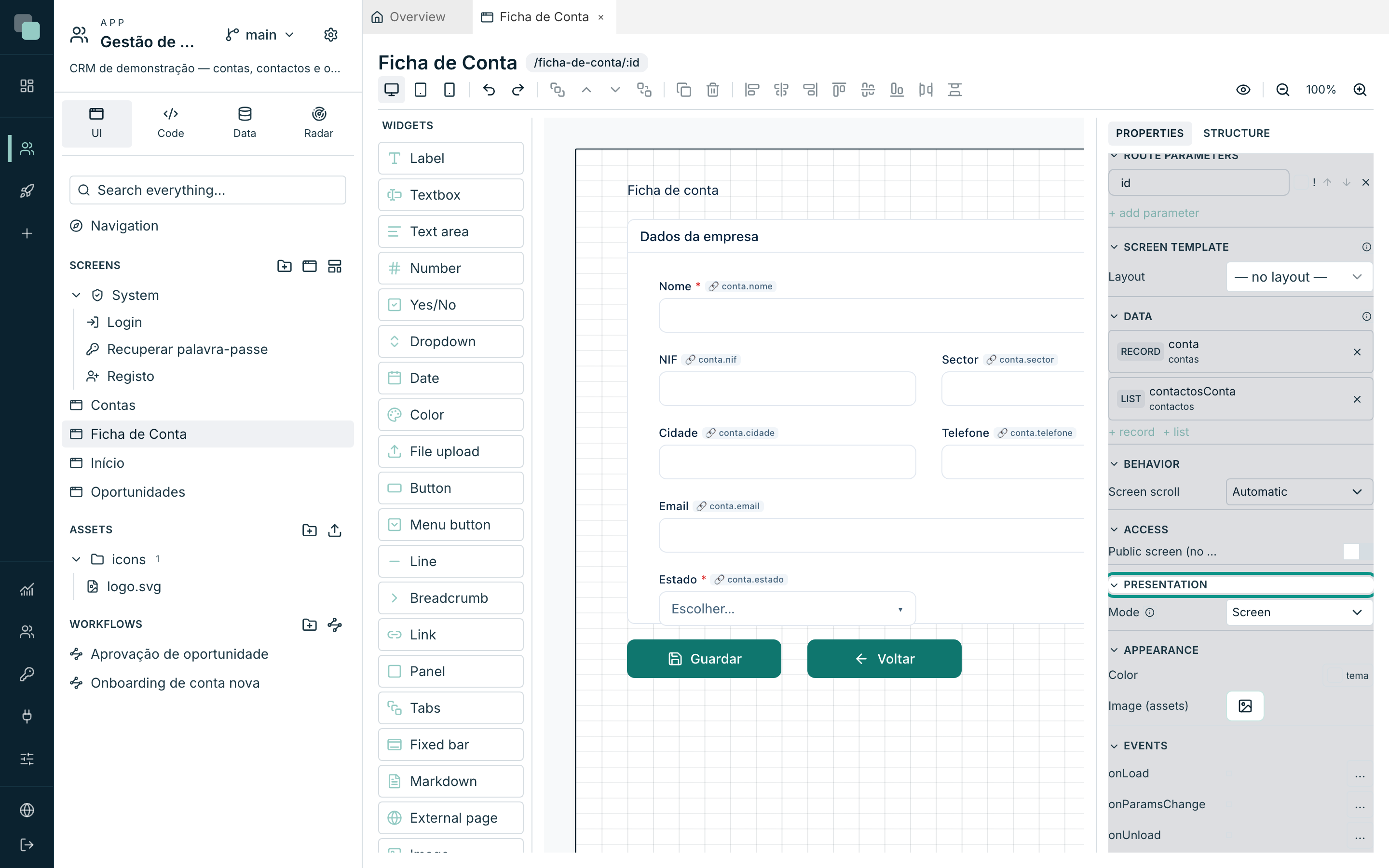
| Option | What it does |
|---|---|
| Mode | Screen (a normal page), Modal (centered) or Side panel (right). The Bar (widget area) mode does not open on top: it is the content of a widget area of the App navigation. |
| Width (px) / Height (px) | The modal's size. The side panel uses the full height. |
| Close button | Shows the × in the corner. |
| Click outside closes / Esc closes | The two usual ways out. With a list or a popover open, the first click outside or Esc closes only that. |
| Refresh screen behind on close | On closing, the datastores of the calling screen read again. Anything typed and not yet saved in a form of that screen stays as it is. |
With unsaved changes, closing with the ×, with Esc or with a click
outside asks for confirmation first. What counts are fields bound to a record
datastore that the person edited and has not saved yet; typing and then
deleting does not count. Closing from code, with keplin.ui.closeModal, does
not ask.
Which one? The Modal (centered) suits simple records — a catalogue entry with a description and a state, a confirmation. The Side panel (right) opens on the right at full height and is the choice for records with many fields, panels and lists inside (a customer with its addresses and contacts): the same record in a centred modal ends up small and cramped, and the list behind stays visible beside it. The Width (px) is the panel's.
The section's own hint sums it up: Opens ON TOP of the calling screen
(Link, events or keplin.ui.openModal). Excluded from direct navigation.
Opening and closing by code
const resultado = await keplin.ui.openModal("/nova-conta", { setor: "banca" });
if (resultado) {
  keplin.data.store("contas").reload();
}
openModalreceives the screen's route (or id) and, optionally, the parameters.- The promise only resolves when the modal closes, and carries the value the modal returned.
- Inside the modal,
keplin.ui.closeModal(valor)closes and returns that value. - Modals stack: a modal can open another. With several side panels open, each lower panel stays visible in a strip to the left of the panel above it; with Click outside closes on, a click on that strip closes the panel above.
- Asking for the screen that is already on top, with the same parameters, does not open another one: the call returns the promise of the open one. This is what stops a double click from opening two identical records.
Note
keplin.nav.go("/rota") to a screen configured as Modal (centered)
or Side panel (right) opens it as a modal instead of navigating.
It is on purpose: a modal screen has no address of its own in the
navigation.
Recipes
Save and go back (the onClick of the Ficha de Conta's Save button):
const ok = await keplin.data.store("conta").save();
if (ok) {
  keplin.ui.toast("Conta guardada");
  keplin.nav.go("/contas");
}
Open the record card of the clicked row (onRowClick of a Table):
keplin.nav.go(`/ficha-de-conta/${keplin.event.row["id"]}`);
Filter a table by a textbox (onChange of the box — replace the ids
with your screen's):
const texto = keplin.widgets.get("w_pesquisa").getValue();
keplin.widgets.get("w_cta_tab1").setFilter(texto ? { nome: { contains: texto } } : null);
Confirm before a destructive action (onClick of a button):
if (!(await keplin.ui.confirm("Apagar esta conta?"))) return;
Hide a button from whoever cannot use it (onLoad of the screen):
if (!keplin.session.can("contas.eliminar")) {
  keplin.widgets.get("w_apagar").hide();
}
Why doesn't…?
- Why won't it let me save the event? The code does not compile. The message is Event not saved: the code is not runnable — fix it and save.
- Why does
keplin.widgets.get("...")give an error? The id does not exist on this screen. Confirm it at the top of the inspector, with the widget selected; and remember that each device is a tree of its own (see Layouts and per-device design). - Why didn't
onParamsChangefire on opening? On purpose: it only fires on changes. For the start, useonLoad. - Why does the modal return nothing? Either the target screen does not exist, or whoever is using it has no permission to open it — in both cases the promise resolves with no value. Check the route and the permissions.
- Why doesn't the report's window open? You put the
openafter anawait. Open first. - Why does my event seem not to run? Check the Radar: the errors of the events' code end up there, with screen, widget and event — and the Radar takes you straight to that event's editor.