Supported types
The six database engines an app can connect, each one's fields, what each engine knows how to do, and the tools to create and change tables without leaving the platform.
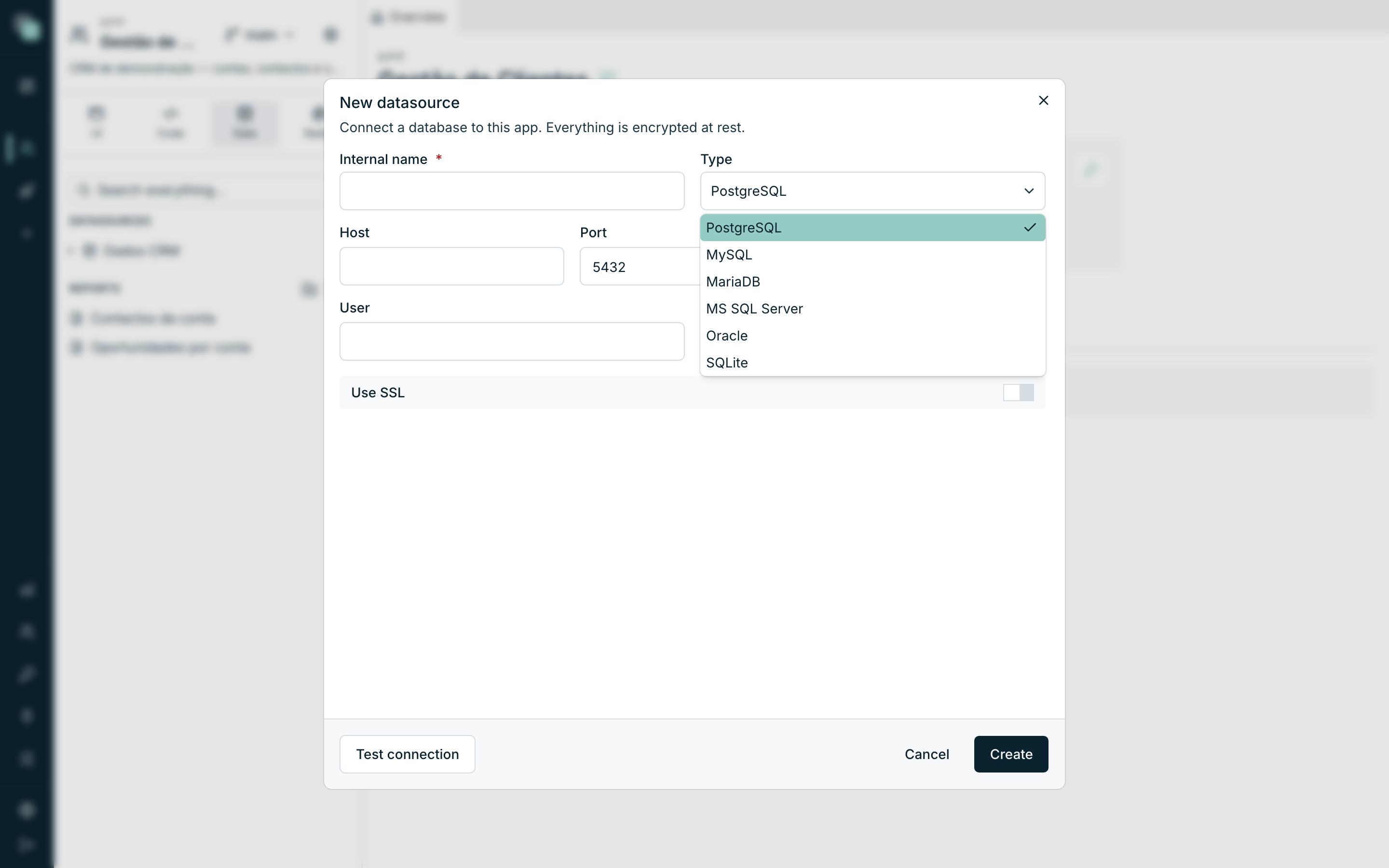
When creating a datasource, the Type field decides everything else: the connection fields the form shows, the parameter markers the SQL uses, and what the platform lets you create in that database (views, procedures, triggers). This page walks through the six types, one by one.
Quick view
| Type | Connects to | Default port | Particulars |
|---|---|---|---|
| PostgreSQL | PostgreSQL server | 5432 | Use SSL switch |
| MySQL | MySQL server | 3306 | Use SSL switch |
| MariaDB | MariaDB server | 3306 | Use SSL switch |
| MS SQL Server | Microsoft SQL Server server | 1433 | Encrypt, Trust server certificate, legacy TLS, Query timeout (s) |
| Oracle | Oracle database | — (goes in the connect string) | A single Connect string field |
| SQLite | Local, file-based database | — (there is no server) | No credentials; the database lives with the app |
Note
The first five are external databases — servers of yours, which the platform contacts over the network with the credentials you register. SQLite is the special case: a file-based database, stored with the app itself.
PostgreSQL, MySQL and MariaDB
The three share the same form:
| Field | What it is |
|---|---|
| Host | Server address (name or IP) |
| Port | Comes filled in with the engine's (5432 or 3306) |
| Database | The name of the database inside the server |
| User | The account the platform connects with |
| Password | That account's password — it is never shown again |
| Use SSL | Turns on the connection's encryption, if the server demands or supports it |
Tip
Use a database account dedicated to the app, with privileges only over what the app needs. Every query — from APIs, scripts and console — runs with this account, and its privileges are the ceiling of what the app can do.
In MySQL and MariaDB, a BOOLEAN (TINYINT(1)) column enters the model as
Yes/No. Tables brought into the model before this version keep the column as
a number; the checkbox still works with it (1 is checked, 0 unchecked).
The platform's PostgreSQL
If the installation has a PostgreSQL server configured, the Internal tab of the creation modal offers PostgreSQL without any of the fields above: the platform creates a new database on that server, with an account of its own, and stores the credentials encrypted. The database is closed to other apps and is deleted when the datasource is deleted. For everything else (model, APIs, SQL console) it behaves like a regular PostgreSQL.
MS SQL Server
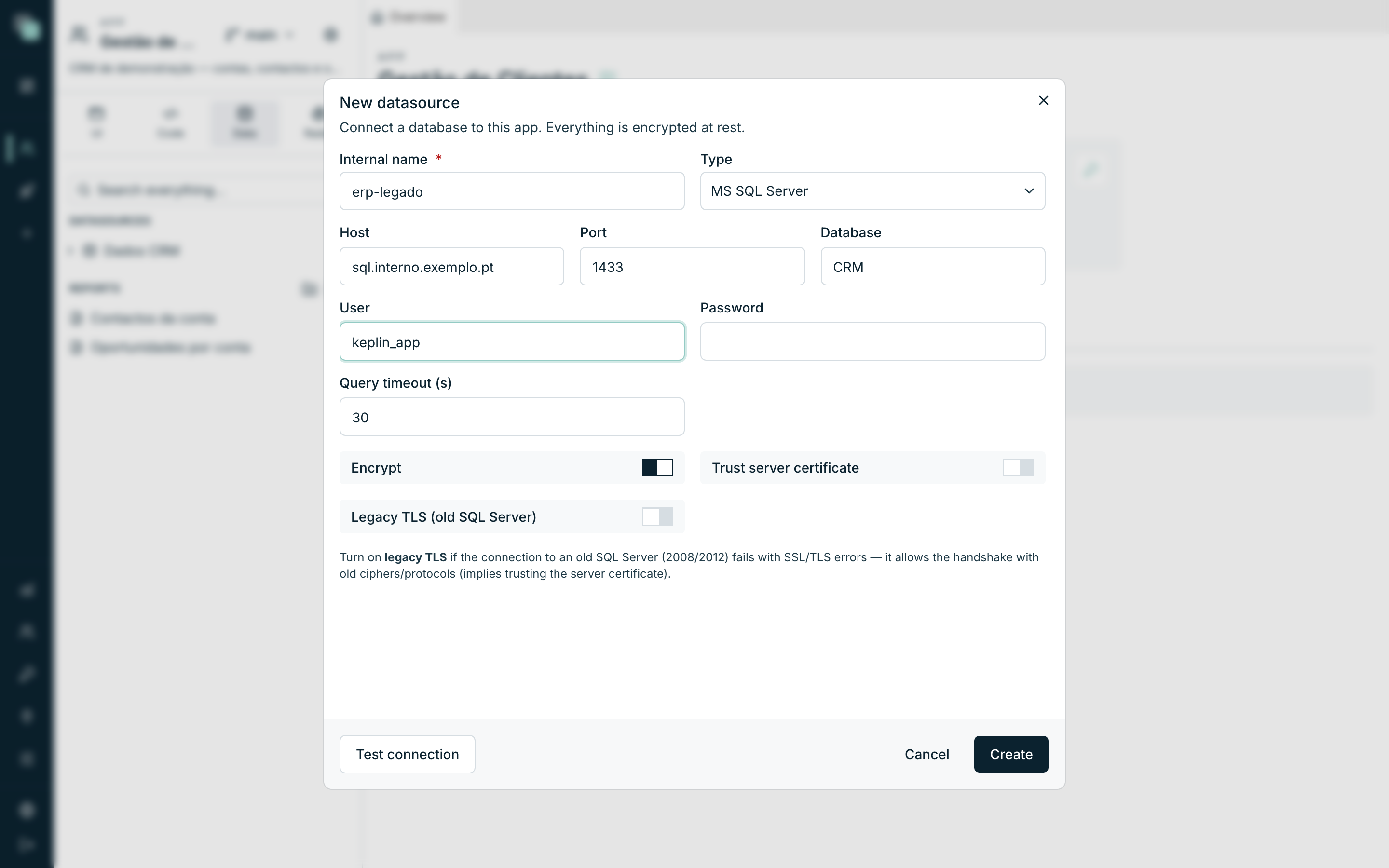
Besides Host, Port (1433), Database, User and Password, SQL Server brings four options of its own:
| Option | What it is for |
|---|---|
| Query timeout (s) | Maximum time of each query, in seconds (comes at 30). Raise it if you have long stored procedures — below that, they die halfway with a timeout error. |
| Encrypt | Encrypts the connection (comes on). |
| Trust server certificate | Accepts the server's certificate without validating it — typical on internal servers with a self-issued certificate. |
| Legacy TLS (old SQL Server) | See below. |
The form itself explains when to turn the last one on: "Turn on legacy TLS if the connection to an old SQL Server (2008/2012) fails with SSL/TLS errors — it allows the handshake with old ciphers/protocols (implies trusting the server certificate)."
Tip
Connection to a SQL Server 2008/2012 failing with SSL messages? It is almost always this: turn on legacy TLS and test again. The option lowers the security level of this connection only — it does not affect the other datasources.
Oracle
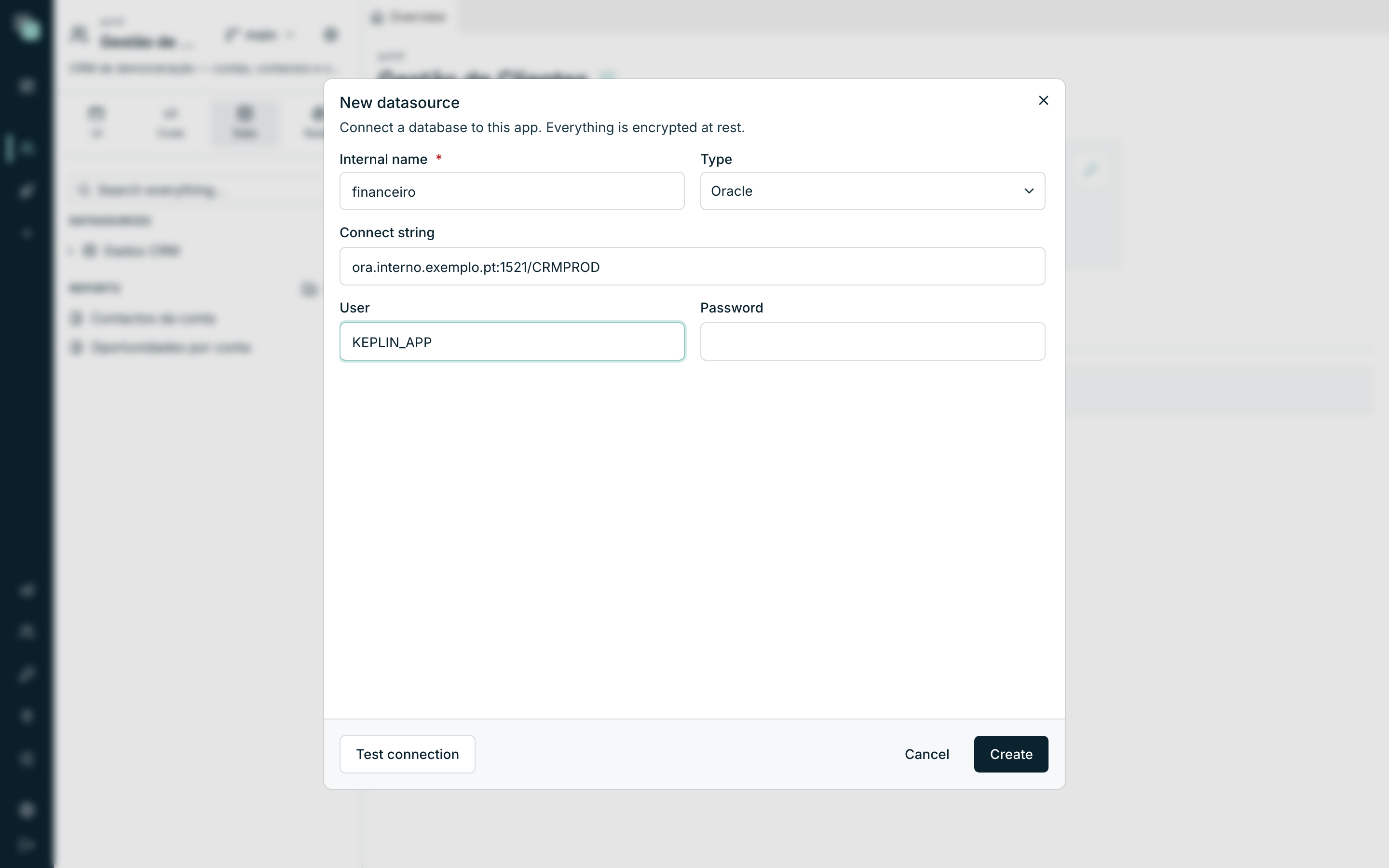
Oracle does without a separate host and port — the address all goes in one field:
| Field | What it is |
|---|---|
| Connect string | In the format host:port/service_name — e.g. ora.interno.exemplo.pt:1521/CRMPROD |
| User | The Oracle schema/account the platform connects with |
| Password | That account's password |
Note
In Oracle, connecting as a user is entering their schema — that schema's tables appear in the object tree without a prefix.
SQLite — the database that lives with the app
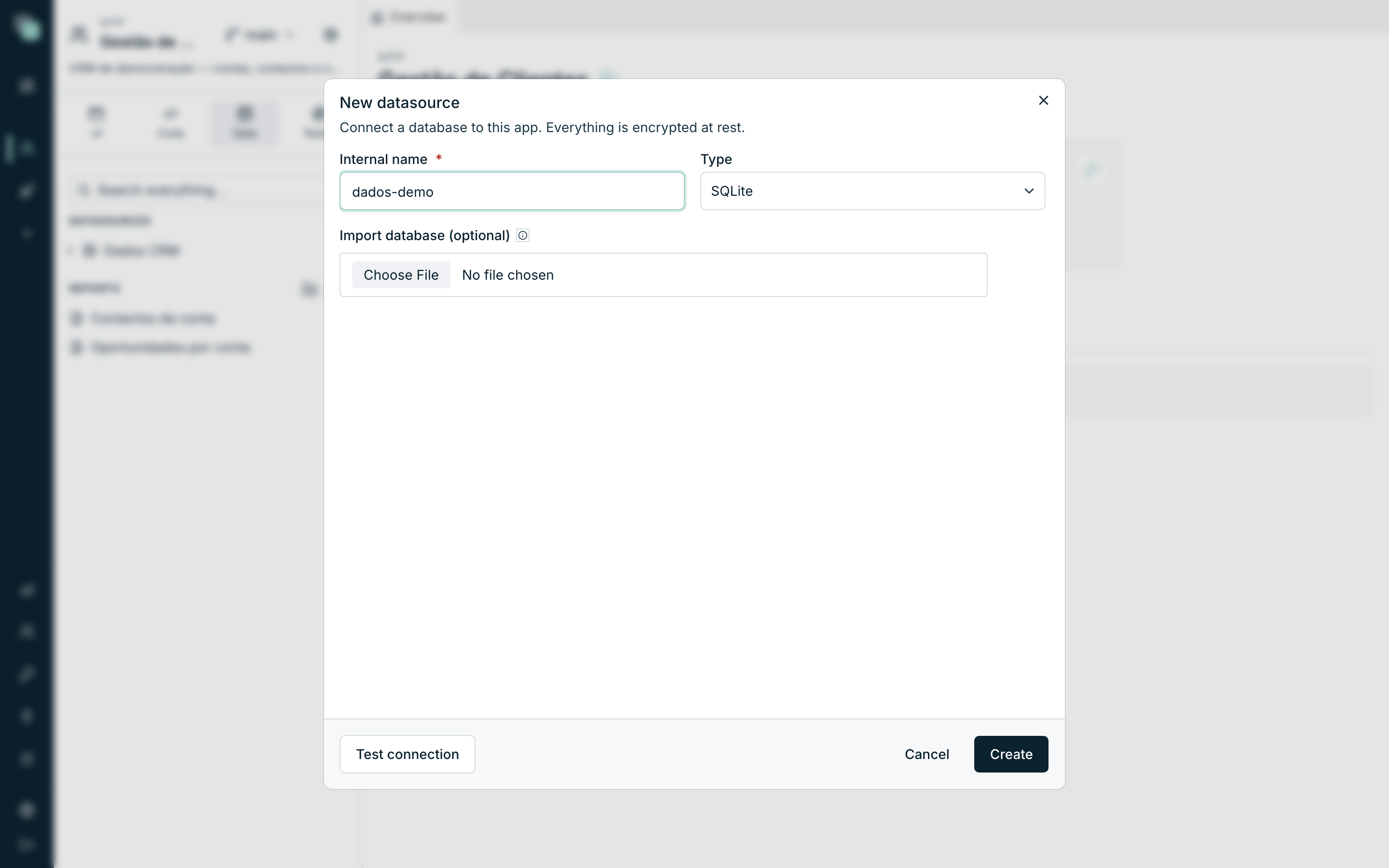
SQLite is the type for data that belongs to the app: prototypes, demos, a small database that does not justify a server. There is no Host, Port, User or Password — there is a file, and it is the platform that keeps it:
- Choose SQLite in the Type field.
- Optionally, use Import database (optional) to send a
.db,.sqliteor.sqlite3file you already have. - Click Create. As the field's help says: "With no file, an empty database is created. The file is stored with the app — no paths to enter."
Three behaviours to know:
- Creating has no Test connection — the file does not exist yet, there is nothing to test. The button appears after saving, on editing.
- Editing never swaps the file — the file is the datasource; editing the connection creates no new database and deletes no data.
- Deleting the datasource says goodbye to the data — unlike the external types, here the database lives with the app.
What each engine knows how to do
The platform only offers you what the engine supports — the options that do not exist on an engine do not appear in its menu. The map:
| Capability | PostgreSQL | MySQL | MariaDB | MS SQL Server | Oracle | SQLite |
|---|---|---|---|---|---|---|
| Views | Yes | Yes | Yes | Yes | Yes | Yes |
| Functions / procedures | Yes | Yes | Yes | Yes | Yes | No |
| Triggers — timings | BEFORE, AFTER, INSTEAD OF | BEFORE, AFTER | BEFORE, AFTER | AFTER, INSTEAD OF | BEFORE, AFTER, INSTEAD OF | BEFORE, AFTER, INSTEAD OF |
| Trigger with several events at once | Yes | No (one per event) | No (one per event) | Yes | Yes | No |
| Trigger drawn on the visual canvas | Yes | Yes | Yes | Yes | Yes | No (SQL only) |
| Changing an existing column's type/nullability | Yes | Yes | Yes | Yes | Yes | No |
| Schema (optional) field on objects | Yes | — | — | Yes | Yes | — |
Note
On SQL Server there is no BEFORE — the equivalent is INSTEAD OF. And on SQLite, changing an existing column's type forces the table to be recreated; the option does not appear.
Creating and changing objects (DDL)
You do not need another tool to work on the database's structure: the ⋯ menu of each datasource in the Data panel creates objects, and the tree edits the existing ones. In every case the platform generates the SQL for the datasource's engine and runs it for real on the database.
| Action | What it does |
|---|---|
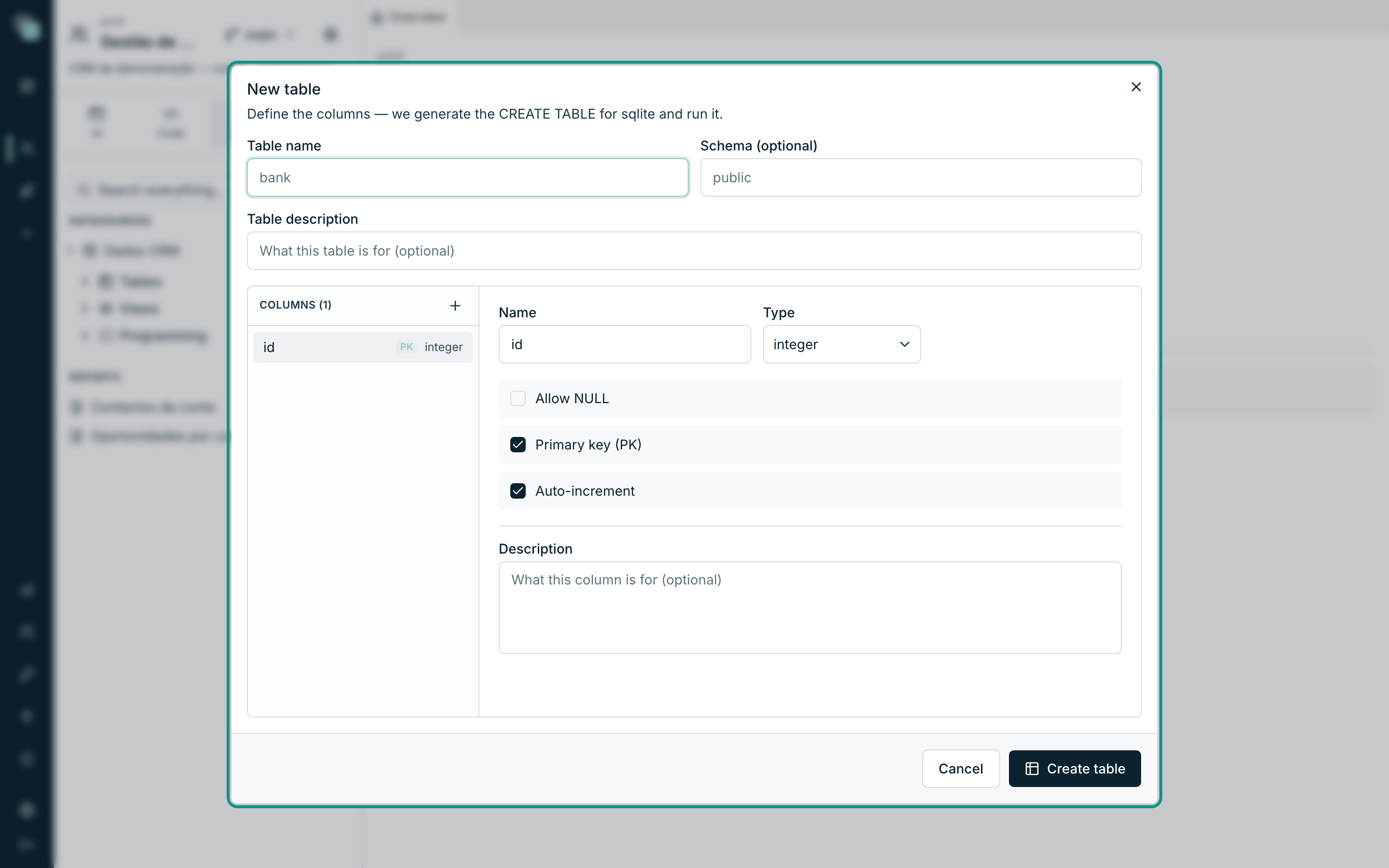
| New table | "Define the columns — we generate the CREATE TABLE for the engine and run it." Columns with type, Allow NULL, Primary key (PK), Auto-increment, and a friendly name for the apps. |
| Edit structure (on a table) | "Change columns and indexes — generates and runs the corresponding ALTER / CREATE INDEX." Also creates and deletes indexes. |
| New view | You write the view's SQL and it runs. |
| New function / procedure | You write the SQL and it runs (on the engines that support them). |
| New trigger | Initial data in the modal; the flow is built next on the visual canvas. |
| Refresh objects | Rereads the database's structure — use it after changes made outside the platform. |
Warning
This is true DDL, on your true database — a DROP or an ALTER here is as final as one run on any other SQL client. And it only works if the connection's User has the privileges to create and change objects.
The SQL console
At the bottom of each datasource's Model screen lives the SQL console: write on the left, click Run, and the results appear as a table (up to 500 rows), with per-column filters. The editor autocompletes with the datasource's tables and columns, and the View data of any table in the tree opens the console with a select already made.
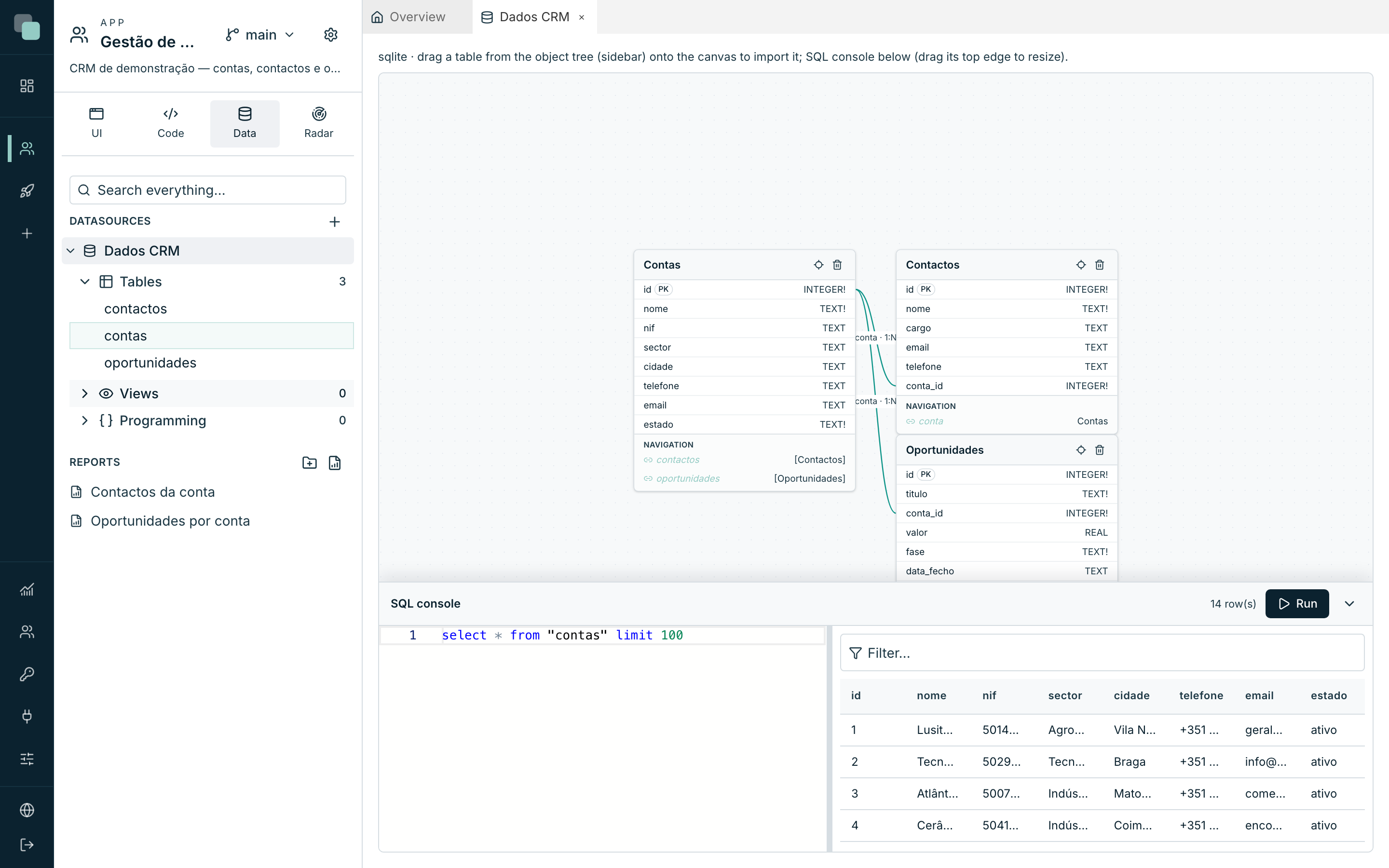
The console is for administrators, and the write operations are recorded in the audit trail — the details are on the Testing the connection and security page.
Parameter markers per engine
When you write SQL in scripts, the values go in a separate list — never glued into the sentence — and each engine has its own marker syntax:
| Engine | Markers | Example |
|---|---|---|
| PostgreSQL | $1, $2, … |
select * from contas where cidade = $1 |
| MySQL / MariaDB | ? |
select * from contas where cidade = ? |
| MS SQL Server | @p1, @p2, … |
select * from contas where cidade = @p1 |
| Oracle | :1, :2, … |
select * from contas where cidade = :1 |
| SQLite | ? |
select * from contas where cidade = ? |
Tip
On the APIs' SQL steps you do not need this table: you write :nomeDoArg
and the platform handles the conversion for the chosen engine. In Oracle,
avoid passing dates as a parameter — prefer the literal, e.g.
TO_DATE('2026-06-25','YYYY-MM-DD').