The test project
What an app's tests are, where they live, how they run without touching real data, and the Tests minitab.
Each app has its own test project: a set of automated tests that tells, after every change, whether what worked still works. A test is a list of steps, such as opening a screen, filling in a field, clicking a button and checking what appears, and it is built like the rest of the platform: by dragging and choosing.
There are four types of test, and a test can mix steps of all of them:
| Type | What it checks | Example |
|---|---|---|
| Screen | A user's path through the app: open, fill in, click, check. | Create a new account and see the row in the table. |
| API | A GraphQL operation of the app: the response, the time, the effect on the data. | getContas returns only Industry accounts, in under 500 ms. |
| Script | A script run: what it returns and what it writes. | The sync script creates three contacts. |
| Workflow | The path of a process: tasks, decisions, notifications. | A request over 10 days goes to management and, once approved, notifies the requester. |
Where tests live
Tests are part of the app, like screens and APIs:
- they live in each version of the app, and merge with the other changes in the merge (see History and merge);
- they appear in the app's history, with who changed them;
- they travel in the app's export and go into templates;
- they have checkout, like the other documents: two people do not save the same test at the same time.
What stays only on this installation are the run results (kept for 30 days).
How they run without touching real data
Each test runs in a new test environment, created for it and deleted at the end:
- The databases are test copies. An internal app database starts with the same structure as the real one, with no rows, and receives the test data. What a test saves does not reach the real database or the next test.
- The accounts are the ones you select in the test environment, one per role, from the app's accounts. A test without a role is a visitor, with no session, and only sees what is public.
- Emails and notifications are held in the test, for the test to check them, and never go out.
- HTTP requests from APIs and workflows receive the simulated responses of the test environment, and never go out to the network.
- The errors a test causes do not appear in the Radar and do not trigger alerts.
Warning
An external database with write access (an ERP's database, for example) cannot be copied: the tests use another datasource of the app, the test datasource, selected in the test environment. While it is missing, no test of the app runs. See The test environment.
The Tests minitab
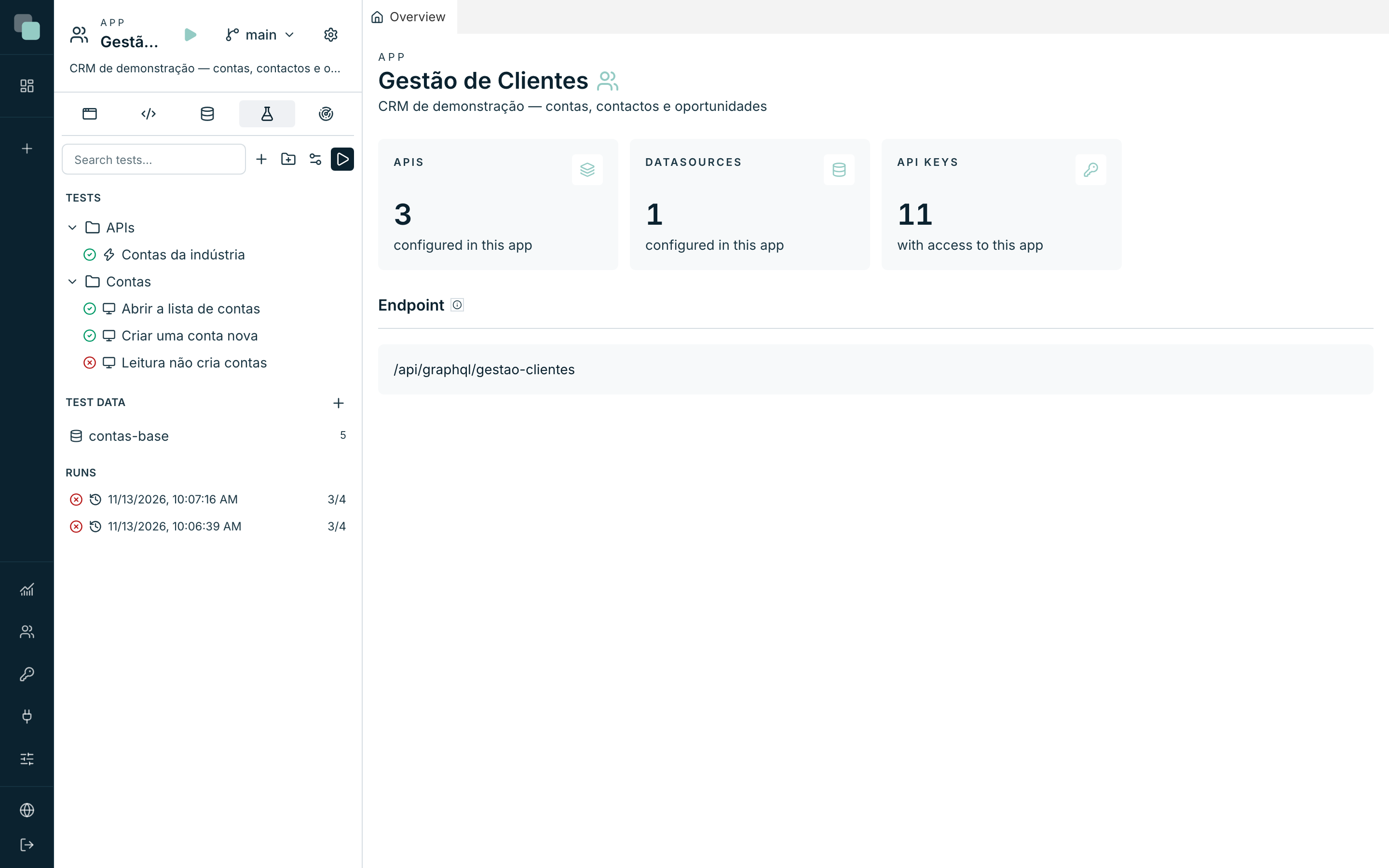
Tests are in the Tests minitab of the app tree, between Data and Radar. The minitabs show only the icon: hover over them to see the name.
The panel has:
- Tests: the tests by folder, each with the result of its last run (green passed, red failed, empty not run yet). To move a test to another folder, drag it onto the folder.
- Test data: the sets of rows that tests load.
- Runs: the recent runs; opening one shows the result.
- Flaky: the tests that pass and fail alternately.
At the top are the search, New test, New test folder, Test environment and Run all tests.
Frequently asked questions
Why does «Tests cannot run» appear? The app has an external database with write access without a test datasource. Open the Test environment and select it, or ask an administrator.
Can a test damage the real data? No. Tests write only to the test copies. The only real database a test reads is an external database in Read only, and on that one the platform refuses any write.
Who can write and run tests? Whoever has the Developer profile on the app. Only an administrator changes the test environment.