Running and reading results
Run one test, a folder or all of them, read the result step by step, the merge gate, the scheduled run, flaky tests and the JUnit export.
Run
- One test: Run in the test bar, or Run in the test's menu.
- A folder: Run folder in the folder's menu.
- All of them: Run all tests, at the top of the Tests minitab.
There is one run at a time per app version. Screen tests open the app in a platform browser shared by the whole installation: with other runs or screenshots going on, a run may wait its turn.
Read the result
The run opens in a tab, Test run. Each test shows its steps, with the state and the duration, and the role it ran with (for example, «as equipa (ana.silva)», or «as a visitor»). The first step that fails leaves the next ones unrun (Not run). The All, Failed and Passed filters narrow the list.
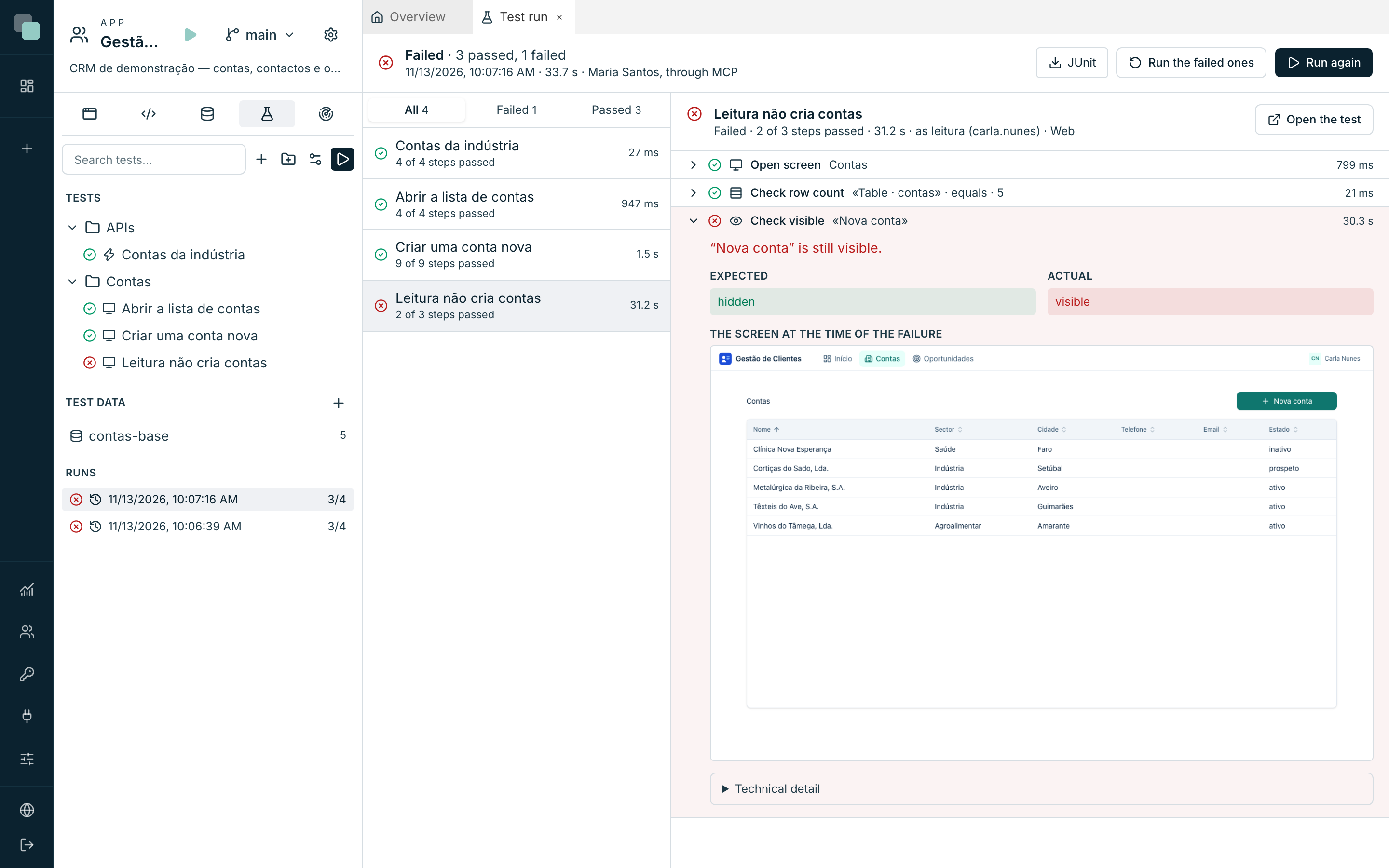
Choose a step to see, on the right:
- the message, with the names on the screen, for example «There is no row with Name = “Têxteis Norte” in “Accounts table”. The step waited 5 s.»;
- the Expected and Actual values;
- on screen steps that failed, The screen at the time of the failure;
- on a Call API step, the Request and the API response, with the duration;
- on a Run script step that ends with an error, the script's error;
- the Technical detail, when the browser could not perform the step.
Run again repeats the same choice of tests, and Run the failed ones repeats only the ones that failed. Cancel run stops at the end of the step that is running. Open the test opens the test in the editor.
The states of a run:
| State | Meaning |
|---|---|
| Passed | Every test passed. |
| Failed | At least one test failed or did not run. |
| Blocked | The test datasource of an external database with write access is not selected; no test ran. |
| Cancelled | Someone cancelled the run. |
| Error | The run did not finish because of a platform error. |
The merge gate
With the gate on in main's test environment, merging a version into main first runs the gate tests in the source version. If they do not pass, the merge dialog says The gate tests did not pass. Nothing was merged., with the tests that failed and Open the run. An administrator can Merge anyway; it is recorded in the audit.
The scheduled run
The scheduled run runs every test at the time of the test environment's expression. A test that fails in a scheduled run becomes a problem in the app's Radar, and the email alerts warn whoever is assigned to the app, as for any other problem.
Flaky tests
A test that passes and fails alternately, with no changes to the app, appears under Flaky, with the sequence of the last runs. A flaky test usually depends on data that changes or on an order that is not guaranteed.
Export to an external CI
JUnit, in a run's result, downloads the run as JUnit XML, the format that continuous integration systems read.
Frequently asked questions
The step failed because of time. The step went over the Seconds per step limit of the test environment. On a slow screen, raise the limit; on a check that never holds, look at the Actual value.
The API step failed with «HTTP request without a simulated response». The API made a request to an address without a simulated response in the test environment. Add it in Simulated HTTP responses.
The test failed with «The role … has no test user». The test signs in to the app with a role, and that role has no account selected in Test environment › Test users. Select an active account with that role.