Antivirus
Connect an antivirus over ICAP, what happens to an infected file, the quarantine, and the checks on the apps' code and on the Python packages.
The files that enter the apps come from outside: attachments that users upload, documents that scripts receive, imported packages. With an antivirus connected, each file is scanned before it is stored, and an infected file never reaches the app's storage.
Keplin has no antivirus of its own: it connects to the company's antivirus over ICAP, the protocol that server antiviruses have in common (for example, ClamAV with c-icap).
Two checks do not depend on the antivirus and are always on: the app code and the Python packages of the scripts.
Connect the antivirus
Only an administrator changes the antivirus.
- In the sidebar, open Settings and, in the Platform group, the Antivirus section.
- In Address, type the ICAP server:
icap://SERVER:1344, oricaps://SERVER:11344with TLS. - Click Find services. The Service list now has the antivirus services that respond on that server. Choose one. If the service has a name that Keplin does not know, choose Other path and type the path that the antivirus administrator gives you.
- Click Test. Keplin sends the EICAR test file, which every antivirus recognises as infected, and a clean file. The test passes when the antivirus recognises the first one and lets the second one through, and the result says how the antivirus flagged the infected file.
- Turn on Scan files with the antivirus. The switch only turns on after the test passes.
- Click Save.
Replace the following:
SERVER: the IP address or the name of the ICAP server.
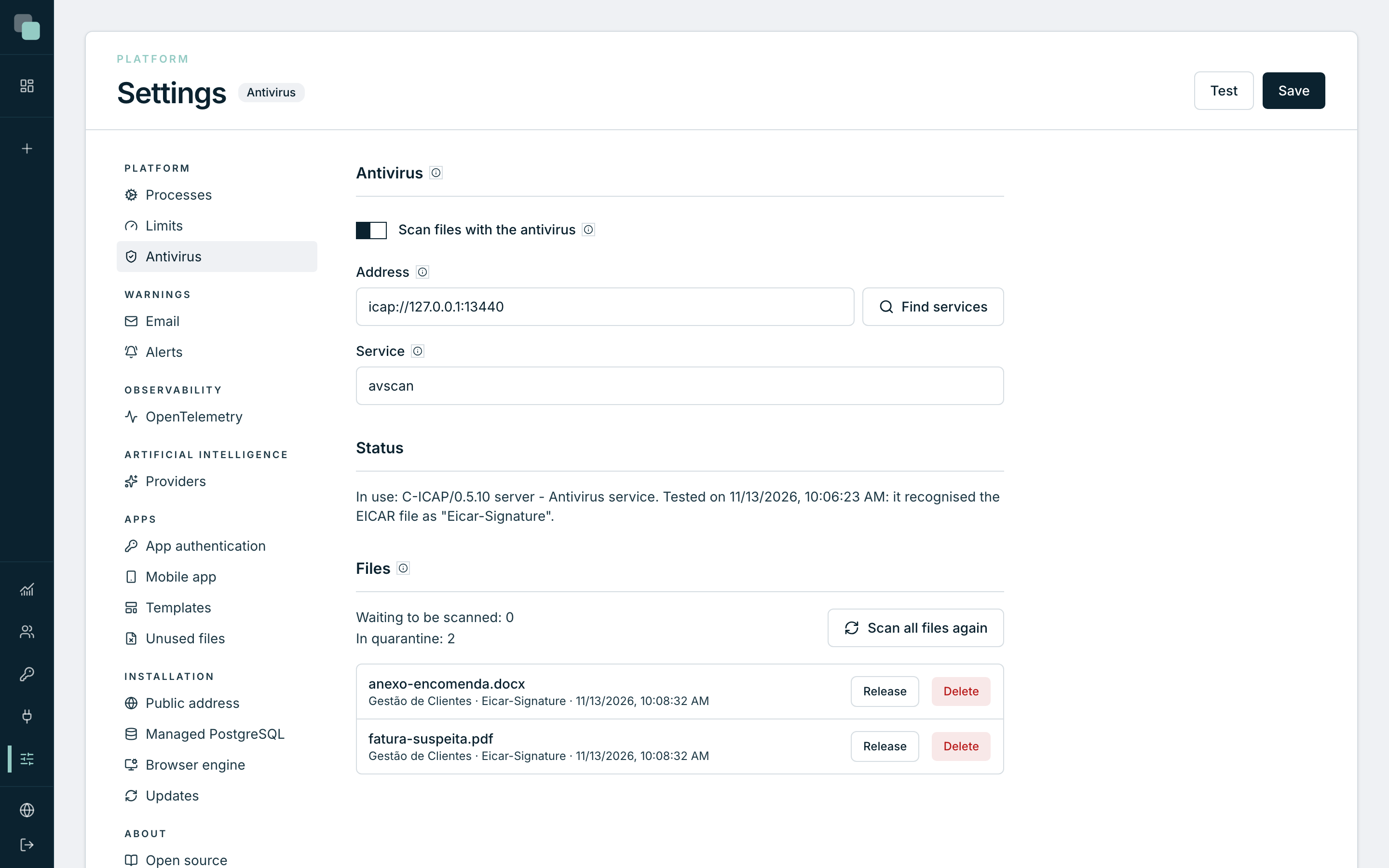
The Status says what is in use, for example «In use: SERVICE. Tested on DATE: it recognised the EICAR file as …», or «No antivirus: files are not scanned.»
When the test fails, the message gives the cause: a name the server cannot resolve, a port that refuses the connection, a firewall that blocks it, a certificate that is not accepted, or a service that did not recognise EICAR.
Note
In an installation with several tenants, the installation's antivirus is configured in the back office. In each tenant's Settings, the section says which antivirus the platform uses, and Use my company's antivirus lets the tenant use its own, as long as the company's ICAP server accepts connections from the platform. Turning it off goes back to the platform's antivirus.
What happens to each file
All the apps' files go through the antivirus: the ones users upload on screens and through the APIs, the files of the scripts and of artificial intelligence, the images uploaded to the assets, a script's folder, imported SQLite databases and imported app packages.
| Result | What happens |
|---|---|
| Clean | The file is stored. |
| Infected | The file is rejected and is never stored. The person who sent it sees the message with the name of the threat, for example: «The file "invoice.pdf" was rejected: the antivirus found "…". The file was not stored.» |
| The antivirus does not respond | The file is stored and stays waiting to be scanned. It is scanned in the background as soon as the antivirus comes back. A stopped antivirus does not stop the apps. |
Each rejected file is recorded in the audit and triggers an email, through the platform alerts (see Email alerts).
The quarantine
Files already stored are scanned again in the background:
- the ones waiting to be scanned;
- the ones from the last seven days, when the antivirus updates its signatures, at most once a day;
- all of them, when you click Scan all files again.
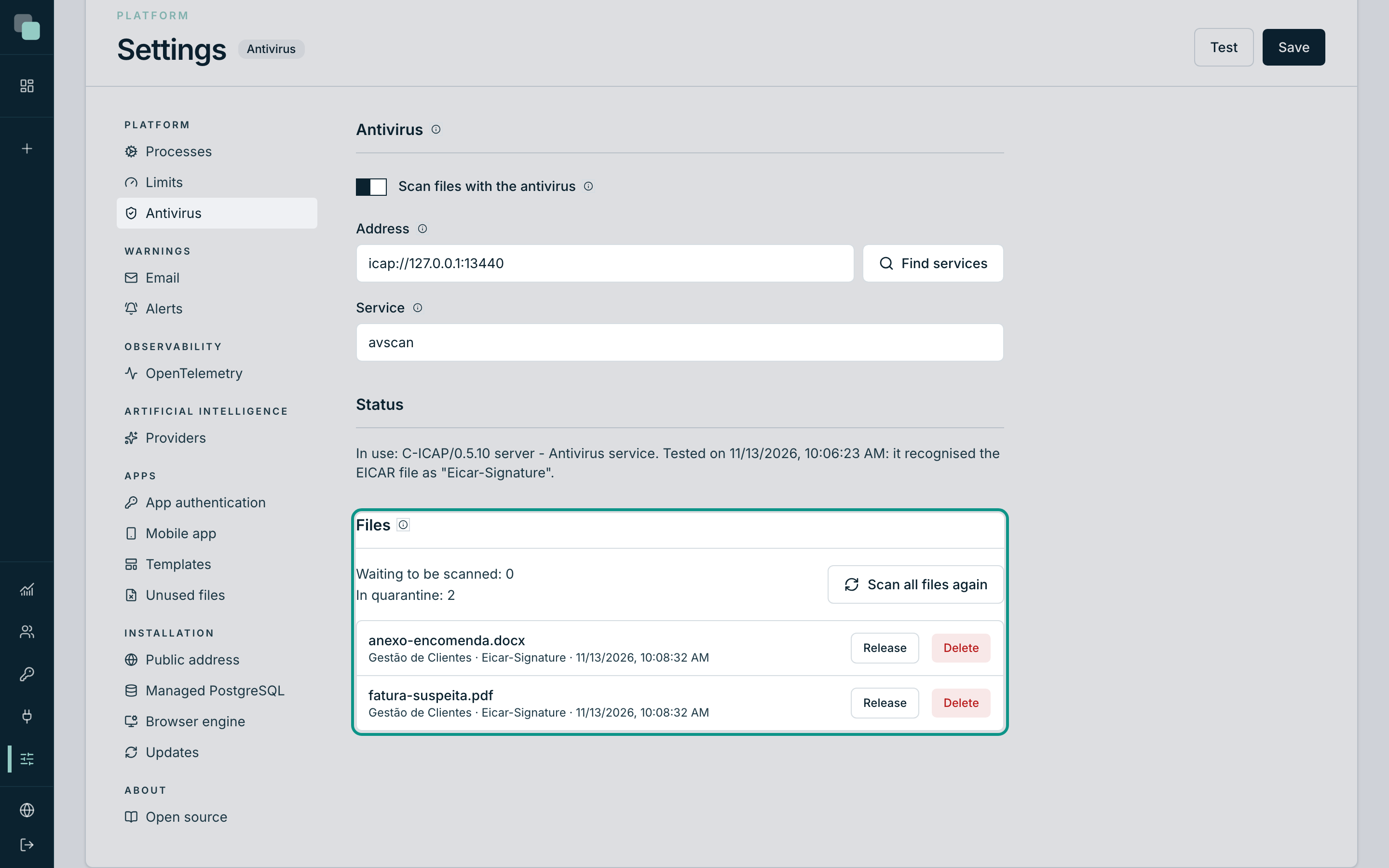
A file that is only found to be infected in one of these scans goes to quarantine: it can no longer be opened or downloaded, and whoever requests it sees «The file … is in quarantine: the antivirus found … Contact the administrator.» The alert warns by email.
The Files block of the Antivirus section has the Waiting to be scanned and In quarantine counters and the list of files in quarantine, with the app, the threat and the date. On each one:
- Delete removes the file from the storage and from the app. It cannot be undone.
- Release gives the file back to the apps. Release it only if you are sure the antivirus was wrong.
The app code
The apps' code is checked every time it is saved: the scripts, the screen events, the layouts, the widgets, the workflows and the API steps. The check only looks for what has no legitimate use in an app:
- a reverse shell, which gives another machine control of the server;
- cryptocurrency mining;
- a program downloaded from the internet and run right away;
- code hidden in base64 and run;
- reading the system's passwords or permissions;
- a fork bomb, which leaves the server without resources.
When it finds one of these patterns, the code is not saved, and the message says where and on which line, for example: «The code was not saved: "import.py", line 12, contains a program downloaded from the internet and run right away.»
The Python packages of the scripts
Before installing a script's dependencies (see Dependencies and files), Keplin compares the packages that are about to be installed, including their dependencies, with the OpenSSF public list of malicious packages. A package on that list is not installed, and the message says which one and why.
Without access to the list (for example, on a server without internet), the installation goes ahead.
Frequently asked questions
The test says the server did not recognise the EICAR file. Scanning is turned off in that service, or the antivirus flags infected files in a way that Keplin does not know. Check the service with the antivirus administrator.
The test says the antivirus also blocked the clean file. With that configuration, the antivirus would block every file. Check the service configuration.
The antivirus was stopped. Did the files sent in the meantime go unscanned? They stayed waiting to be scanned and are scanned when the antivirus comes back. The Waiting to be scanned counter shows how many are left.